
• Products

    Payroll Software

    Automate, timely pay employees, and maintain compliance

    Modern HR

    Utilize a current platform for people to do more

    Recruitment Management

    Before and after joining, provide a Positive Candidate Experience


    Integrations

    Your HR software is compatible with all of your preferred Tools

    LMS

    Smarter learning, simpler growth.

    Performance & Careers

    Objectives and Key Results (OKRs), ongoing criticism

    Time & Attendance

    Track time, manage leaves, and make payments on time

    Timesheet Software

    Workflow that may be customised to track usage and time


    Security

    Your employee data is safe and Constantly Accessible

    Mobile App

    HR made easy: manage, track, and connect anytime, anywhere.

  • Customers

    Customers

    Support

  • Pricing
  • About Us

    Our Story

    Our Team

    Partners

    Contact Us

  • AI Agents

    AI ATS

    AI PMS

    AI LMS

    AI Buddy

Sign Up
Log In
HOME

HOME

  • Products
    • Payroll Software
      • Compliance
      • Expense Management
      • Compensation
      • Loans & Advances
      • Employee Finances
    • Performance & Careers
      • 360 - Degree Reviews
      • OKRs & Goals
      • Continuous Feedback
    • Modern HR
      • Employee Profiles
      • Documents
      • Task Management
      • Pulse Surveys
      • HR Analytics
    • Time & Attendance
      • Attendance Management
      • GPS / Mobile Attendance
      • Shift Management
    • Recruitment Management
      • Applicant Tracking
      • Employee Onboarding
    • Timesheet Software
    • Integrations
    • Security
    • LMS
    • Mobile App
  • Customers
    • Customers
    • Support
  • Pricing
  • About Us
    • Our Story
    • Our Team
    • Partners
    • Contact Us
  • AI Agents
    • AI ATS
    • AI PMS
    • AI LMS
    • AI Buddy
  • Blog
  • Products
    • Payroll Software
      • Compliance
      • Expense Management
      • Compensation
      • Loans & Advances
      • Employee Finances
    • Performance & Careers
      • 360 - Degree Reviews
      • OKRs & Goals
      • Continuous Feedback
    • Modern HR
      • Employee Profiles
      • Documents
      • Task Management
      • Pulse Surveys
      • HR Analytics
    • Time & Attendance
      • Attendance Management
      • GPS / Mobile Attendance
      • Shift Management
    • Recruitment Management
      • Applicant Tracking
      • Employee Onboarding
    • Timesheet Software
    • Integrations
    • Security
    • LMS
    • Mobile App
  • Customers
    • Customers
    • Support
  • Pricing
  • About Us
    • Our Story
    • Our Team
    • Partners
    • Contact Us
  • AI Agents
    • AI ATS
    • AI PMS
    • AI LMS
    • AI Buddy
  • Blog

Core HR

6
  • Overview
  • Getting Started
  • Tasks
  • Helpdesk
  • Team
  • Documents

Settings

1
  • Organizational Setup
View Categories
  • Home
  • Docs
  • Core HR
  • Documents

Documents

1 min read

Company Files 

Company Files include the document that belongs to the company and has to share with the employees of the company. Adding company files in Ojoor is a simple process that can be done in just a few steps. Here’s how to do it:

  • Go to the Team > Docs > Company Files.
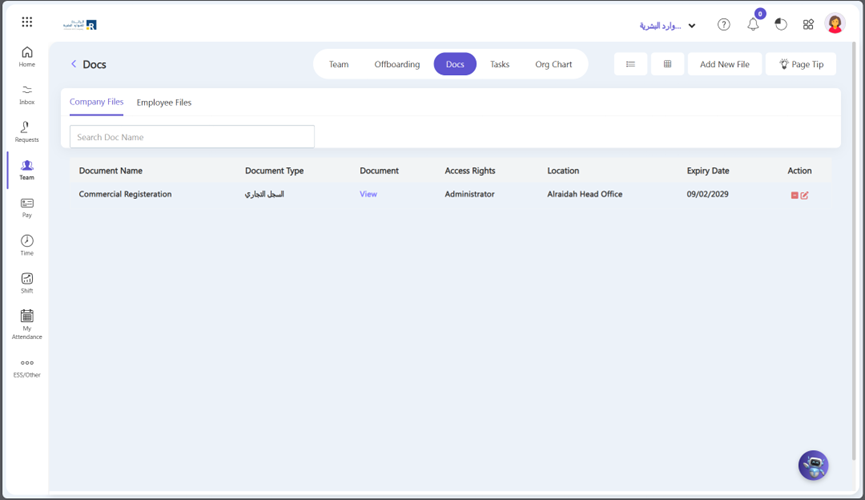
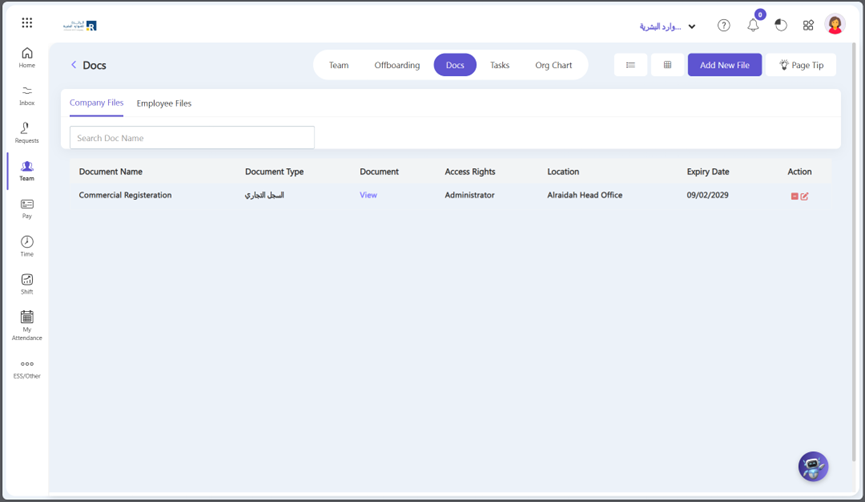
Click on the “Add New Files” button.
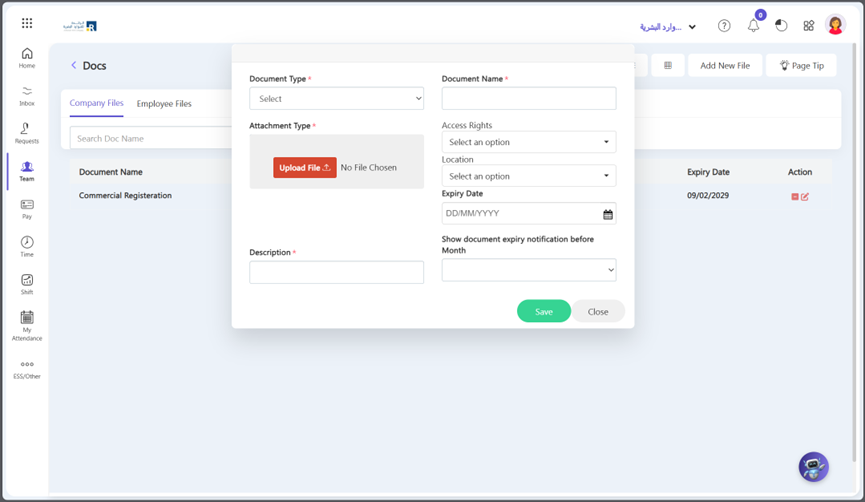
  • A pop-up window will appear. Fill in the fields that appear on the screen.
  • Select the files you want to upload from your computer.
  • You can give Document Type, Name, Description, and Access Rights and Location.
  • Add the Expiry date of a document and you can set the notification for a reminder of expiry.
Employee Files

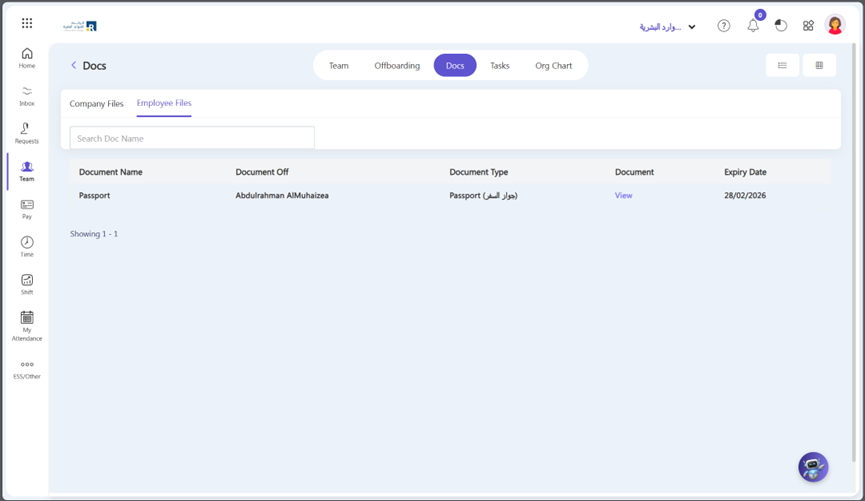
In this section, you can see the employee files As an employer, it is important to keep track of your employees’ files for various reasons such as their National ID card, passport, CV, Family Id and others type of documents that you previously attached to the employee profile. Here’s how you can view employee files:

  • Locate the files: Go to Team > Docs > Employee Files
  • Review the files: Once you have located the files, review them thoroughly. You can see the employee files that you previously attached to the employee profile.

Note: 

  “To upload employee files, kindly navigate to Team, then Employee Profile, Edit Profile, and finally Docs. “
Updated on April 8, 2026

What are your Feelings

  • Happy
  • Normal
  • Sad

Share This Article :

  • Facebook
  • X
  • LinkedIn
  • Pinterest
TeamHelpdesk

Subscribe Newsletter

© 2025 Ojoor. All rights reserved.

Contact
sales@ojoorhr.com
+966547315697

Popular Modules

  • Applicant Tracking System
  • AI-Powered Recruitment and Onboarding
  • Employee Management
  • AI – Powered PMS
  • AI – Powered LMS
  • Best HR Software

Company

  • About Us
  • Contact Us
  • Our Team
  • Customers

Resources

  • Blog
  • Knowledge Base
  • Release Notes
  • FAQs

Terms of Service

Privacy Policy

Security Policy

GDPR Compliance