• Products

    Payroll Software

    Automate, timely pay employees, and maintain compliance

    Modern HR

    Utilize a current platform for people to do more

    Recruitment Management

    Before and after joining, provide a Positive Candidate Experience


    Integrations

    Your HR software is compatible with all of your preferred Tools

    LMS

    Smarter learning, simpler growth.

    Performance & Careers

    Objectives and Key Results (OKRs), ongoing criticism

    Time & Attendance

    Track time, manage leaves, and make payments on time

    Timesheet Software

    Workflow that may be customised to track usage and time


    Security

    Your employee data is safe and Constantly Accessible

    Mobile App

    HR made easy: manage, track, and connect anytime, anywhere.

  • Customers

    Customers

    Support

  • Pricing
  • About Us

    Our Story

    Our Team

    Partners

    Contact Us

  • AI Agents

    AI ATS

    AI PMS

    AI LMS

    AI Buddy

Sign Up
Log In
HOME

HOME

  • Products
    • Payroll Software
      • Compliance
      • Expense Management
      • Compensation
      • Loans & Advances
      • Employee Finances
    • Performance & Careers
      • 360 - Degree Reviews
      • OKRs & Goals
      • Continuous Feedback
    • Modern HR
      • Employee Profiles
      • Documents
      • Task Management
      • Pulse Surveys
      • HR Analytics
    • Time & Attendance
      • Attendance Management
      • GPS / Mobile Attendance
      • Shift Management
    • Recruitment Management
      • Applicant Tracking
      • Employee Onboarding
    • Timesheet Software
    • Integrations
    • Security
    • LMS
    • Mobile App
  • Customers
    • Customers
    • Support
  • Pricing
  • About Us
    • Our Story
    • Our Team
    • Partners
    • Contact Us
  • AI Agents
    • AI ATS
    • AI PMS
    • AI LMS
    • AI Buddy
  • Blog
  • Products
    • Payroll Software
      • Compliance
      • Expense Management
      • Compensation
      • Loans & Advances
      • Employee Finances
    • Performance & Careers
      • 360 - Degree Reviews
      • OKRs & Goals
      • Continuous Feedback
    • Modern HR
      • Employee Profiles
      • Documents
      • Task Management
      • Pulse Surveys
      • HR Analytics
    • Time & Attendance
      • Attendance Management
      • GPS / Mobile Attendance
      • Shift Management
    • Recruitment Management
      • Applicant Tracking
      • Employee Onboarding
    • Timesheet Software
    • Integrations
    • Security
    • LMS
    • Mobile App
  • Customers
    • Customers
    • Support
  • Pricing
  • About Us
    • Our Story
    • Our Team
    • Partners
    • Contact Us
  • AI Agents
    • AI ATS
    • AI PMS
    • AI LMS
    • AI Buddy
  • Blog

Core HR

  • Overview
  • Getting Started
  • Tasks
  • Helpdesk
  • Team
  • Documents

Settings

  • Organizational Setup
  • Assets
  • Security
  • Managing Employee Data
  • Employee Groups Management
  • Shifts
  • Utility

Time

  • Live Attendance
  • Employee Overtime
  • Leave Management
  • Employees Attendance

Payroll

  • Run Payroll
  • Loan, Advance And Provident Fund
  • Expenses
  • Payroll Setting
  • Monthly Inputs
  • Email Tax Certificate
  • Sandwich Rule

Team Request

  • View Team Summary
  • Team Requests
  • Team Attendance

Employee Self Service

  • Dashboard
  • My Profile
  • My Account
  • My Attendance
  • My Payslip
  • HR Requests
View Categories
  • Home
  • Docs
  • Expenses

Expenses

< 1 min read

How to Create an Expense Category as Admin? 

Expense Category:

Before doing expense request, you need to create “Expense Category”. For this 

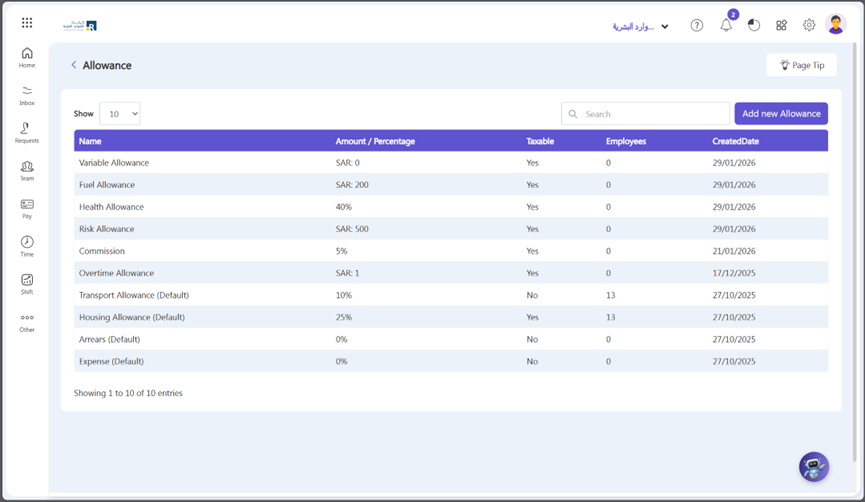
  • Go to Others => Setup => Pay => Allowance
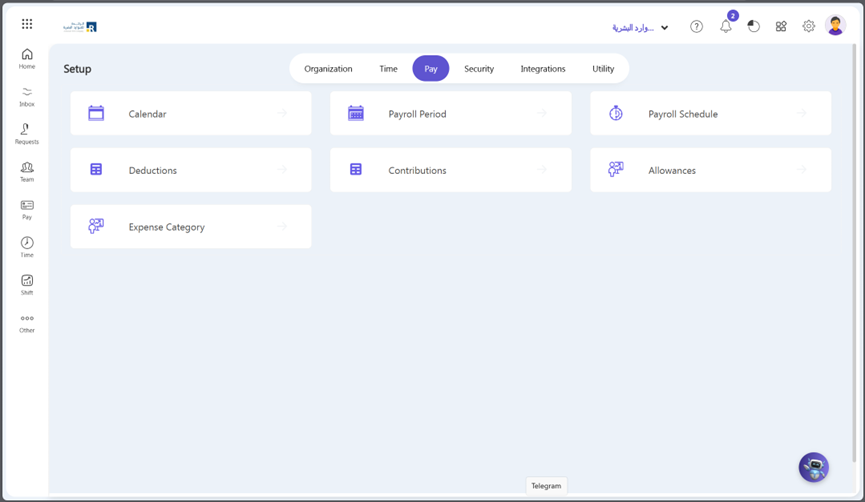
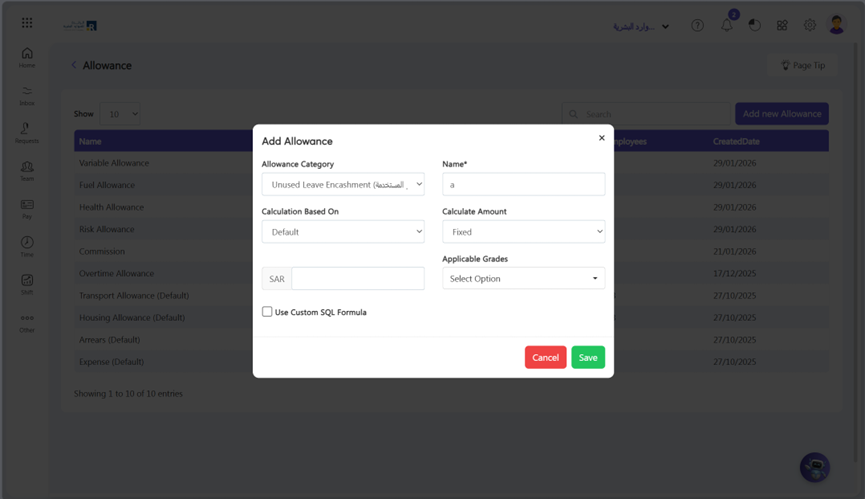
  • Click Add New Allowance
  • Select ‘Expense’ under ‘allowance category, expense type, expense name and other fields. After saving, the expense allowance move to Expense Category.
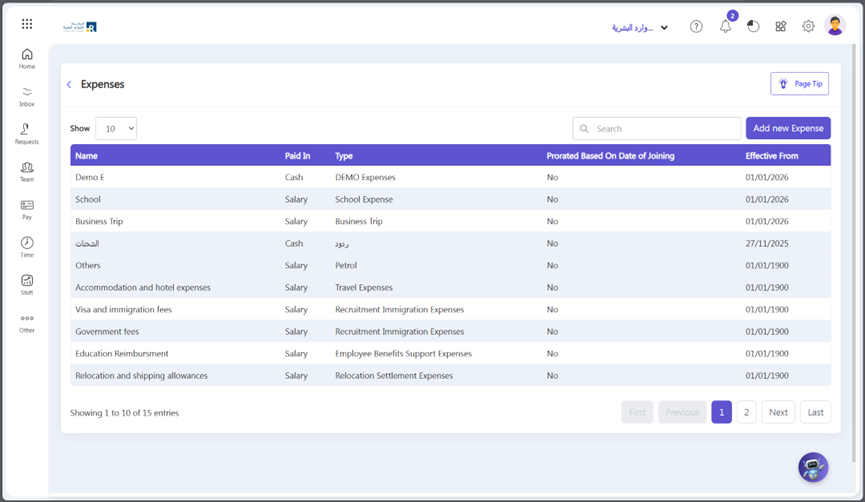
  • Go to Others => Setup => Pay => Expense Category
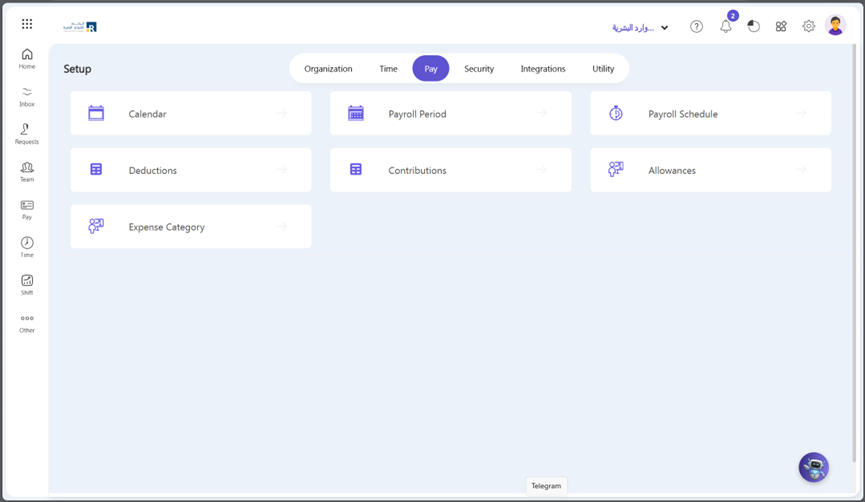
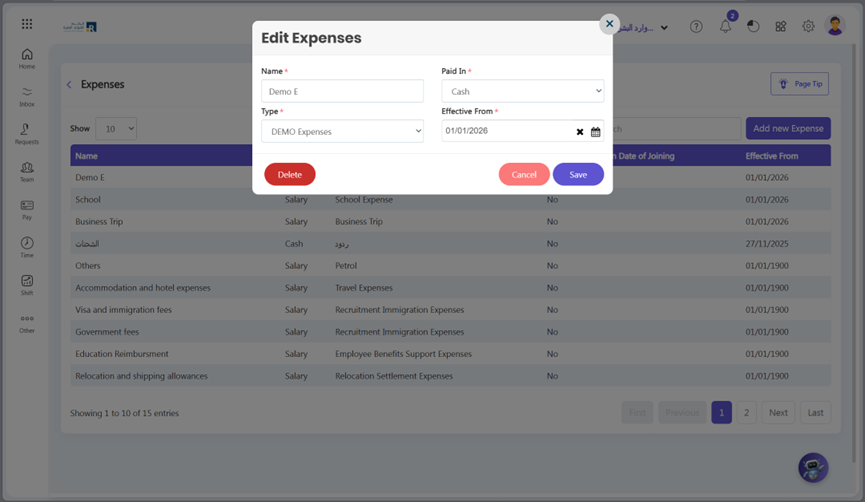
  • Click the expense allowance that you created in the allowance section.
  • Paid In: Select expense paid method, either it is salary or cash.
  • Effective from: Mention the date from which this expense category is effective to use.
  • Click on the Save Button.
  • Now your employee can request an expense for this expense category.
Updated on May 10, 2026
Sandwich RuleLoan, Advance And Provident Fund

Subscribe Newsletter

© 2025 Ojoor. All rights reserved.

Contact

sales@ojoorhr.com


+966547315697

Popular Modules

  • Applicant Tracking System
  • AI-Powered Recruitment and Onboarding
  • Employee Management
  • AI – Powered PMS
  • AI – Powered LMS
  • Best HR Software

Company

  • About Us
  • Contact Us
  • Our Team
  • Customers

Resources

  • Blog
  • Knowledge Base
  • Release Notes
  • FAQs

Terms of Service

Privacy Policy

Security Policy

GDPR Compliance